.xsn
InfoPath form templates
The template file from InfoPath 2007, 2010 and 2013, including browser-enabled forms published to SharePoint. Its views, schema and default values are read straight from the package.
InfoPath .xsn + .xml in · PDF and Excel out
InfoPath Forms Services is gone from SharePoint Online, and your form libraries are now folders of XML nobody can open. FormArchive renders every submission with its original layout, exports them to searchable PDFs, and flattens every field to Excel, in bulk, on your own computer.
Enter your email to get the download link
Works with InfoPath 2007, 2010 and 2013 forms. Mac and Windows.
How it works
Download the form library from SharePoint (the .xml submissions) and the .xsn template it was built on. Drag both into FormArchive. No SharePoint connection, no admin consent, no server.
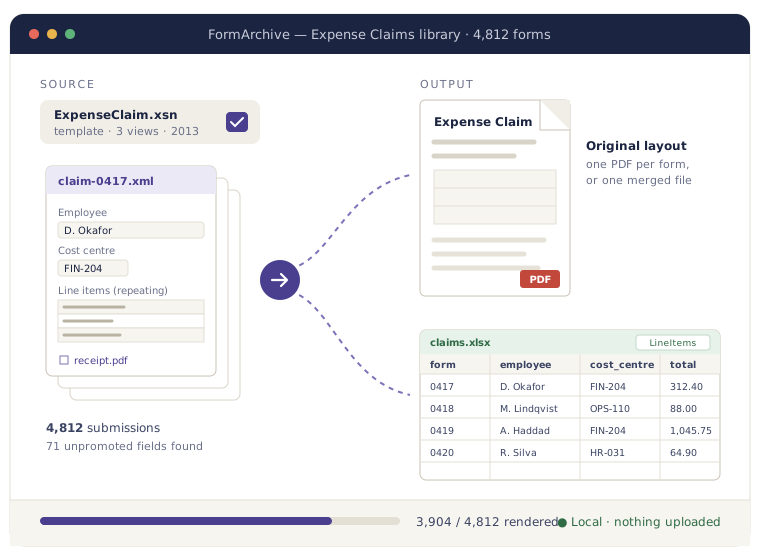
Every submission renders with its original views, the way people filled it in. Flip between forms, search across all of them, and see which fields were never promoted to a column.
One click writes a PDF per form or one merged PDF, an Excel workbook with every field, and a folder of the attachments people uploaded. File it, hand it to records, or load it into whatever replaced InfoPath.
FormArchive applies the view stylesheets stored inside your .xsn, so the PDF looks like the form your staff filled in, with its labels, sections and tables. Pick which view to export when a template has several.
Each form becomes a row, with a column for every field in the schema, promoted or not. Repeating sections and tables go to their own sheets, linked back to the form they came from.
Files people attached inside a form are stored as base64 text in the XML. FormArchive decodes them back to the original files with their original names, in one folder per form.
Lost the .xsn? FormArchive reads the XML on its own and shows every field in a clean generic view, with group names as headings. Export to PDF and Excel works the same way.
Text in every PDF is real text, not an image, so a records search, Windows search or Spotlight finds a form by a name, a number or a phrase someone typed into it.
Forms often hold HR, finance or student records. FormArchive processes them locally on Mac or Windows and works offline. Nothing is uploaded, ever.
Formats
Built for the files a SharePoint InfoPath library leaves behind. Works with forms designed in InfoPath 2007, 2010 and 2013.
The template file from InfoPath 2007, 2010 and 2013, including browser-enabled forms published to SharePoint. Its views, schema and default values are read straight from the package.
The submissions in a form library or saved to disk, one XML file per form. Thousands at a time, in nested folders.
Already unpacked the template? Point FormArchive at the folder with manifest.xsf, the .xsd schema and the view .xsl files and it uses those directly.
File-attachment fields inside the XML, decoded back to the original documents, photos and PDFs with their file names.
Any InfoPath XML without its template, shown as labelled fields and tables so nothing in it is unreadable.
FormArchive vs. the alternatives
The existing options are built for enterprise migrations. FormArchive is for the admin who needs one library readable for the next seven years.
| Lightning Tools Form Migrator | Nutrient converter | An old InfoPath 2013 PC | FormArchive | |
|---|---|---|---|---|
| Self-serve, no sales call | — | — | ✓ | ✓ |
| Bulk export of a whole library | ✓ | ✓ | — | ✓ |
| Every field to Excel, including unpromoted ones | Varies | Varies | — | ✓ |
| Works on Mac | — | — | — | ✓ |
| Setup | Sales-led project | Server or Power Automate flow | Find a PC that still has it | Drag in a folder |
| Support status | Vendor support | Vendor support | Out of support, Windows only | Supported |
| Price | From $950 + 20% support | Quote | — | From $79 one-off |
The enterprise tools are good at what they're for: moving whole InfoPath estates to a new platform. If what you need is to keep old submissions readable and searchable, a desktop app and a one-off price fit the job better.
Pricing
Preview your own forms free before you pay. No subscription for a one-off archive.
$0
See your forms rendered before you spend anything.
Enter your email to get the download link
Works with InfoPath 2007, 2010 and 2013 forms. Mac and Windows.
$79one-off
Archive one form library, up to 10,000 forms.
Enter your email to get the download link
Works with InfoPath 2007, 2010 and 2013 forms. Mac and Windows.
$249/ year
For admins with a whole estate of InfoPath libraries.
Enter your email to get the download link
Works with InfoPath 2007, 2010 and 2013 forms. Mac and Windows.
Prices in USD, excluding sales tax. A library is one set of submissions built on one form template.
InfoPath was used for exactly the forms you can't paste into a web converter: HR records, expense claims, incident reports, student files, grant applications. FormArchive is a desktop app. It reads the files from your disk, writes the PDFs and spreadsheets back to your disk, and works with the network cable unplugged. There is no upload step, no cloud account and no third party in the middle.
Download FormArchive for Mac or Windows and preview your first 10 forms free.
Enter your email to get the download link
Works with InfoPath 2007, 2010 and 2013 forms. Mac and Windows.
Drag the .xml form file into FormArchive. With the .xsn template alongside it, the form renders with its original layout; without the template, you still get every field in a readable generic view. You can then save it as a PDF or export the fields to Excel. InfoPath itself is not needed.
Yes. Point FormArchive at a folder of submissions and it writes one searchable PDF per form, or a single merged PDF, using the view stored in your template. The Library plan covers up to 10,000 forms.
Yes. Every form becomes a row and every field in the schema becomes a column, including fields that were never promoted to SharePoint columns. Repeating sections and tables go to their own sheets, linked to the parent form by its file name.
It reads .xsn templates: the views, the schema, the field names and the defaults inside them. Most people use it to view the forms filled in from that template, but you can open a template on its own to see how a form was laid out.
Download the submissions and the template from each SharePoint form library while you still have access, then export them with FormArchive to PDF for the record and Excel for the data. Our guide to archiving after the InfoPath retirement walks through it library by library.
The submissions are ordinary files in the form library, so you can download them from the library view, sync the library with OneDrive, or script it with PowerShell. The template is usually in the library's Forms folder. Our export guide covers each option.
No. FormArchive runs on your Mac or PC and works offline. The forms, the PDFs and the spreadsheets stay on your disk.
No. FormArchive is an independent app that reads InfoPath and SharePoint files. InfoPath and SharePoint are Microsoft trademarks, used here only to describe which files it opens.